Warehouse management with lot tracking and handheld scanning.
Receive against the ship notice, put away to the right bin, pick by soonest expiry
on a handheld and move stock between your sites — with the lot, the pallet and the stock
ledger intact at every step.
The total is right and the stock is in the wrong place
Most stock problems are not about how many units a site holds. They are about which bin
they are in, which lot they came from, whether they are already promised to an order, and
who was responsible for them at the moment they were damaged. A number that adds up while
the lot or the location is wrong looks fine until a recall, an expiry write-off or a
customer dispute.
Expected deliveries import as X12 856 ship notices or from a spreadsheet. On the dock, the
handheld receives against the notice — scanning an item that is not on it is caught, the
declared lot is prefilled, and shortages and overages are shown line by line. A truck with
no paperwork can still be received.
When the facility has a receiving dock, receipts land there, closed to picking until
they are put away. Putaway planning directs each line to its declared home bin first, then to a bin
already holding the same stock, then to another bin with room.
A delivery on its way, from a supplier’s ship notice. Nothing here is stock until somebody books it in on the dock.Demo tenant — the companies and data shown are fictional.
CapabilityWarehouse
Lots, expiry, pallets and reservations
Stock is held by location down to the bin, by handling unit so a pallet moves with its
contents, and by lot, expiry and condition, with serial numbers through the API.
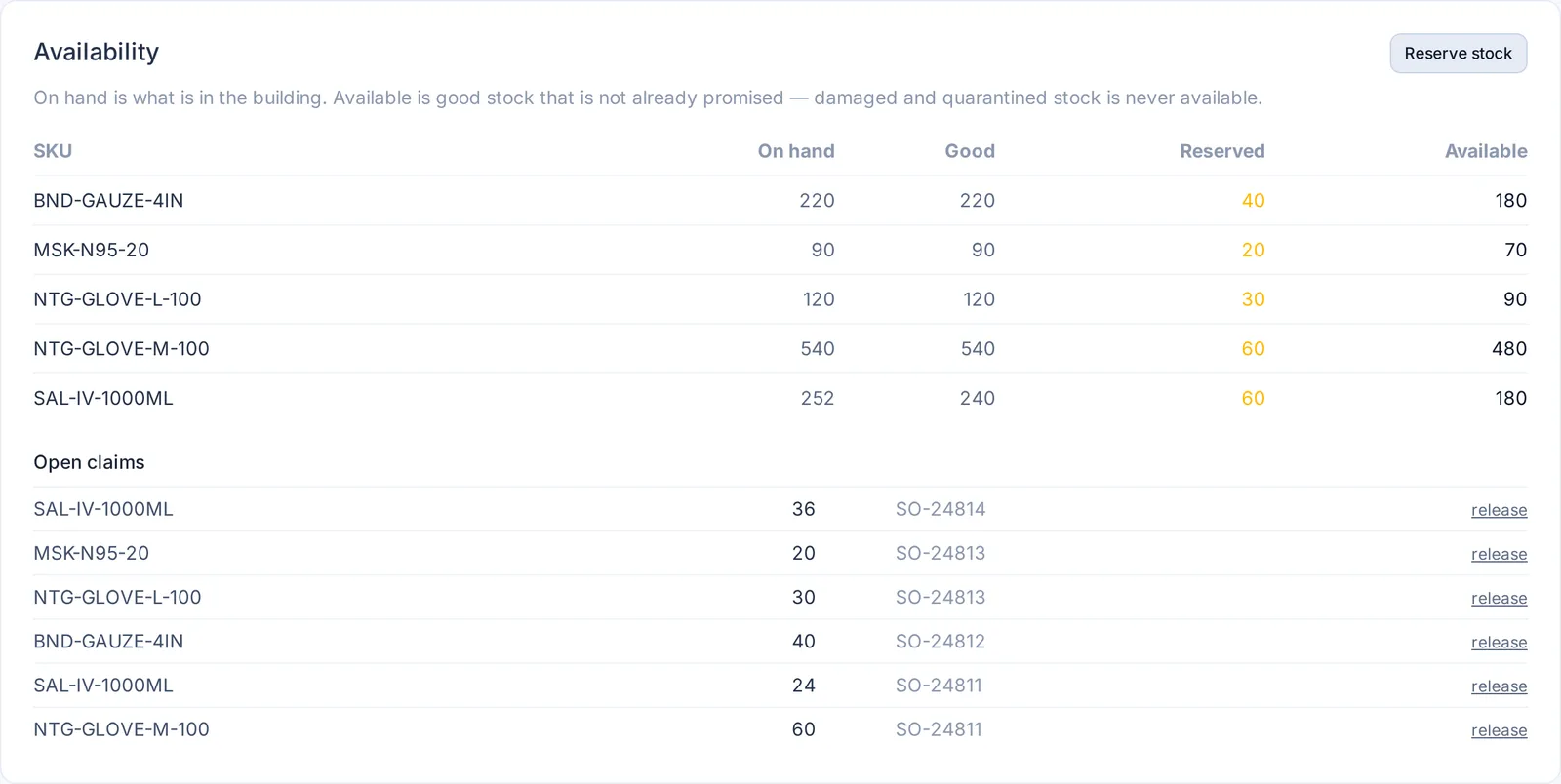
Reservations separate what is on hand from what is promised from
what is available — damaged and quarantined stock is never available.
Includes
Bin locations and hierarchy · pallet license plates per facility · lot and expiry tracking · serial numbers (API) · reservations · pick faces with minimum and maximum levels and replenishment tasks
On hand, good, reserved, available. Damaged stock in quarantine counts as on hand and never as available; each open order’s claim is listed underneath.Demo tenant — the companies and data shown are fictional.
CapabilityWarehouse
Wave picking on RF handhelds
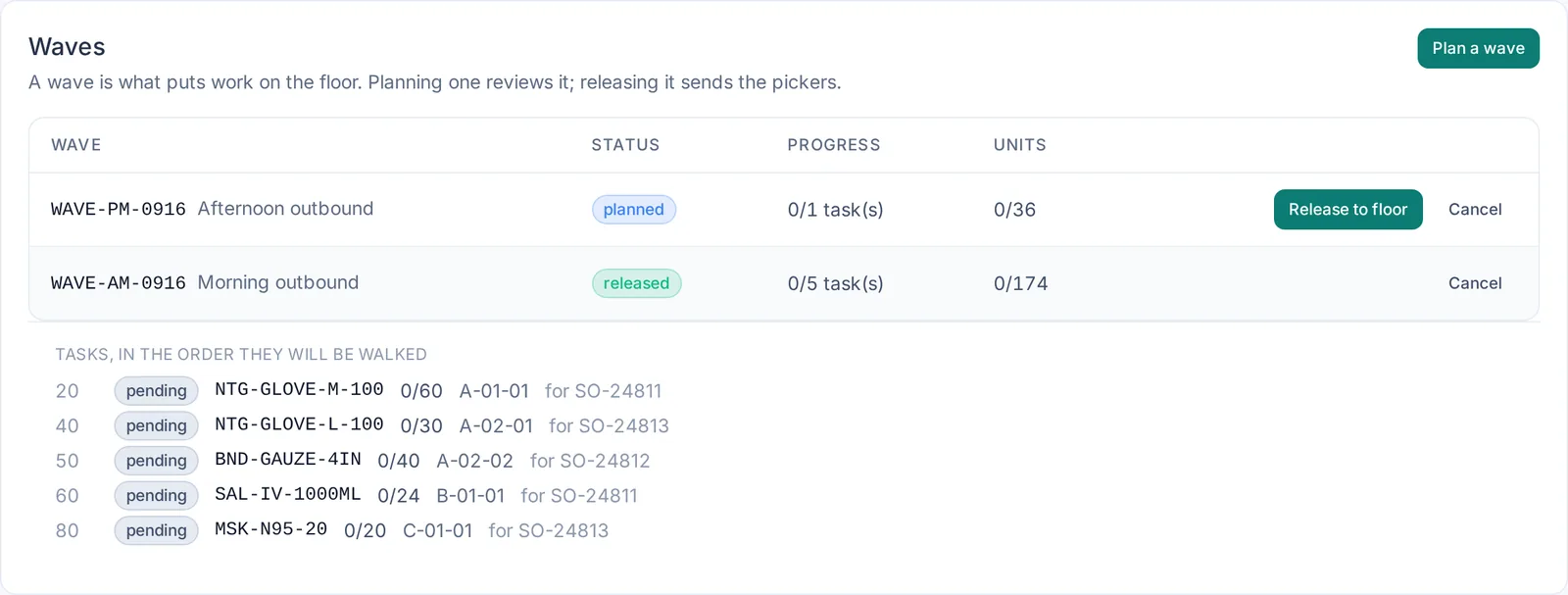
Stock reserved for open orders is planned into a wave and released to the floor. Release allocates real bins
by soonest expiry and orders the work by bin; handhelds are then given one
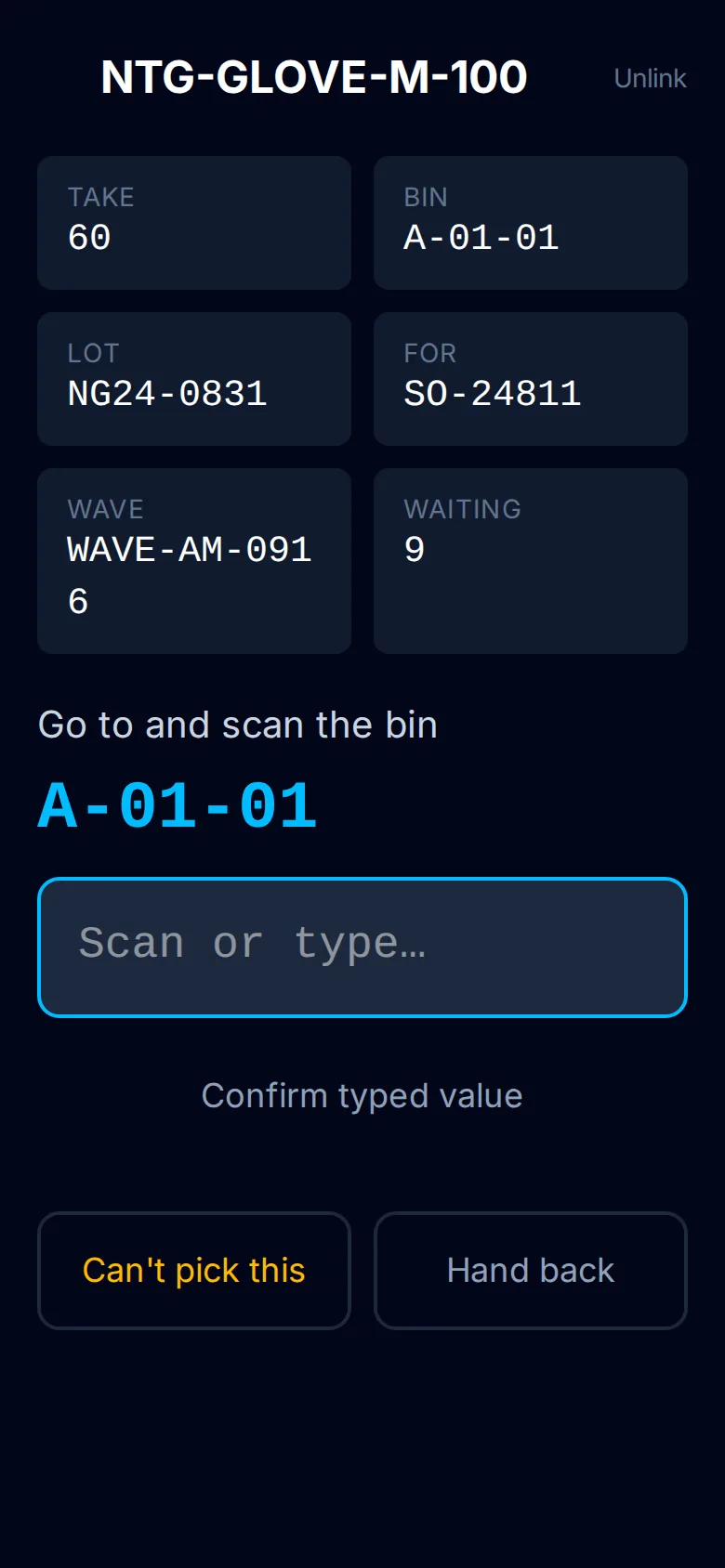
task at a time, so two pickers never take the same line. The picker scans the bin and the
item before confirming a quantity, can report a short pick with a reason, and the wave
closes itself when its last task is done.
The handheld screen runs in the browser of any handheld set to type scanned barcodes into
the focused field — nearly every model — so there is no scanner SDK to install. Each
handheld has its own revocable facility key; a lost device is one revocation, not a
re-key of the building.
A released wave, its tasks in the order the aisles are walked.Demo tenant — the companies and data shown are fictional.
The same task on a handheld. Scan the bin, scan the item, confirm.
CapabilityWarehouse
Blind cycle counts, transfers and a real stock ledger
Cycle counts are blind — the handheld never shows the expected quantity, because a person
counting towards a number stops when they reach it. A variance goes to a supervisor to
apply or reject.
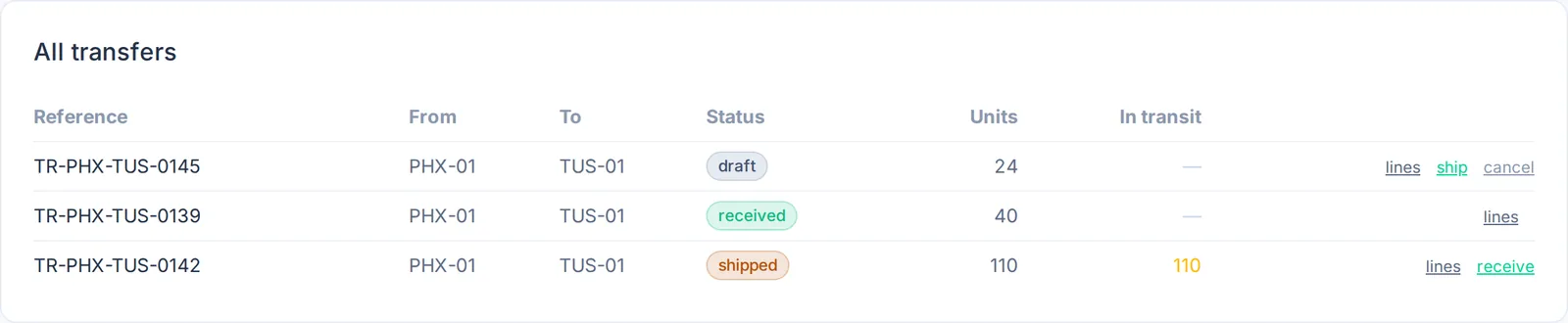
Transfers between your own sites keep the lots that actually left, show what is still in
transit at both ends, and record the movement in each facility's stock ledger. Every
receipt, pick, move and applied count is a ledger entry, and teams can be restricted to the sites
they work at.
Connects to
X12 856 ship notices in · X12 846 inventory advice out (API) · stock levels, locations and expected receipts from spreadsheets or ERP exports
Pairs with
Chain of custody, for 3PL warehouses holding other people's goods
Stock between your sites. What has left one and not reached the other stays visible as in transit.Demo tenant — the companies and data shown are fictional.
Questions
Warehouse management FAQ
Do we need special handheld scanners?
No. Any handheld whose scanner types into the focused field works in the browser, with
no SDK. Each device has its own revocable key.
Does it support lot, expiry and FEFO picking?
Yes. Waves allocate soonest expiry first, and lots are kept through picking, putaway and
transfers between sites.
Can we receive against advance ship notices?
Yes — X12 856 or spreadsheet. The handheld receives against the notice, prefills the
declared lot and shows shortages and overages per line.
How are cycle counts handled?
Blind. A count that differs from the books goes to a supervisor to apply or reject.
We run a 3PL warehouse for several clients. Does that work?
Warehouse pairs with custody, so the handover of goods into and out of your care is
recorded; for separating client organizations see
3PLs and forwarders.
Walk one of your orders through it.
From the ship notice to the pick, on a handheld, with your own items and locations.